
1. Writing and Publishing a Blog
This SOP explains how to select an assigned SEO topic, generate a complete article using GoHighLevel’s AI Blog Builder, review and publish it, request indexing through Google Search Console, and share it in the E-Z Tutoring Facebook group.
September 2026
| Done | Week | SEO Topic | Primary Keyword |
|---|---|---|---|
| Week 1 | August 2026 SAT Scores Are Out: What Your Score Means and What to Do Next | August 2026 SAT score release | |
| Week 1 | September 2026 SAT Predictions: Topics, Difficulty, and Last-Minute Preparation | September 2026 SAT predictions | |
| Week 2 | September 2026 SAT Last-Minute Predictions and Test-Day Checklist | September 2026 SAT last-minute predictions | |
| Week 2 | September 2026 SAT Recap: Was the Test Harder Than Expected? | September 2026 SAT test recap | |
| Week 3 | October 2026 SAT Predictions: What Students Should Start Preparing for Now | October 2026 SAT predictions | |
| Week 3 | October 2026 SAT Registration Deadline: Dates, Late Fees, and What to Know | October 2026 SAT registration deadline | |
| Week 4 | September 2026 SAT Scores Are Out: Should You Retake the SAT in October? | September 2026 SAT score release | |
| Week 4 | October 2026 SAT Final Predictions: Most Important Math and Reading Topics | October 2026 SAT final predictions |
October 2026
| Done | Week | SEO Topic | Primary Keyword |
|---|---|---|---|
| Week 1 | October 2026 SAT Predictions: What to Expect on the October 3 Test | October 2026 SAT predictions | |
| Week 1 | October 2026 SAT Last-Minute Study Plan: What to Do Before Test Day | October 2026 SAT last-minute study plan | |
| Week 2 | October 2026 SAT Recap and Score Predictions: How Difficult Was the Test? | October 2026 SAT score predictions | |
| Week 2 | November 2026 SAT Predictions: What to Study After the October SAT | November 2026 SAT predictions | |
| Week 3 | October 2026 SAT Scores Are Out: How to Understand Your Results | October 2026 SAT score release | |
| Week 3 | Should You Retake the SAT in November After Receiving Your October Scores? | retake SAT in November 2026 | |
| Week 4 | November 2026 SAT Registration Deadline: Everything Students Need to Know | November 2026 SAT registration deadline | |
| Week 4 | November 2026 SAT Predictions: Math and Reading Topics Most Likely to Matter | November 2026 SAT topic predictions |
November 2026
| Done | Week | SEO Topic | Primary Keyword |
|---|---|---|---|
| Week 1 | November 2026 SAT Final Predictions: What to Expect on the November 7 Test | November 2026 SAT final predictions | |
| Week 1 | November 2026 SAT Last-Minute Checklist: What to Do Before Test Day | November 2026 SAT last-minute checklist | |
| Week 2 | November 2026 SAT Recap and Score Predictions: Was the Test Difficult? | November 2026 SAT score predictions | |
| Week 2 | December 2026 SAT Predictions: What Students Should Study Next | December 2026 SAT predictions | |
| Week 3 | November 2026 SAT Score Release: When Scores Come Out and What Happens Next | November 2026 SAT score release | |
| Week 3 | December 2026 SAT Predictions: The Most Important Topics to Review | December 2026 SAT topic predictions | |
| Week 4 | November 2026 SAT Scores Are Out: Should You Retake the SAT in December? | November 2026 SAT scores | |
| Week 4 | December 2026 SAT Registration Deadline and Last-Minute Registration Guide | December 2026 SAT registration deadline |
December 2026
| Done | Week | SEO Topic | Primary Keyword |
|---|---|---|---|
| Week 1 | December 2026 SAT Final Predictions: What to Expect on the December 5 Test | December 2026 SAT final predictions | |
| Week 1 | December 2026 SAT Last-Minute Study Plan and Test-Day Checklist | December 2026 SAT last-minute study plan | |
| Week 2 | December 2026 SAT Recap and Score Predictions: How Hard Was the Test? | December 2026 SAT score predictions | |
| Week 2 | What to Do After the December SAT While Waiting for Your Scores | what to do after December SAT | |
| Week 3 | December 2026 SAT Scores Are Out: How to Understand Your Results | December 2026 SAT score release | |
| Week 3 | December 2026 SAT Scores: Should You Retake the SAT in March 2027? | retake SAT March 2027 | |
| Week 4 | 2027 SAT Test Dates and Deadlines: How to Plan Your Testing Schedule | 2027 SAT test dates | |
| Week 4 | March 2027 SAT Predictions: How to Start Preparing During Winter Break | March 2027 SAT predictions |
These topics are scheduled around the official fall 2026 SAT calendar. Before creating each article, confirm that its dates and deadlines are still accurate using the College Board website.
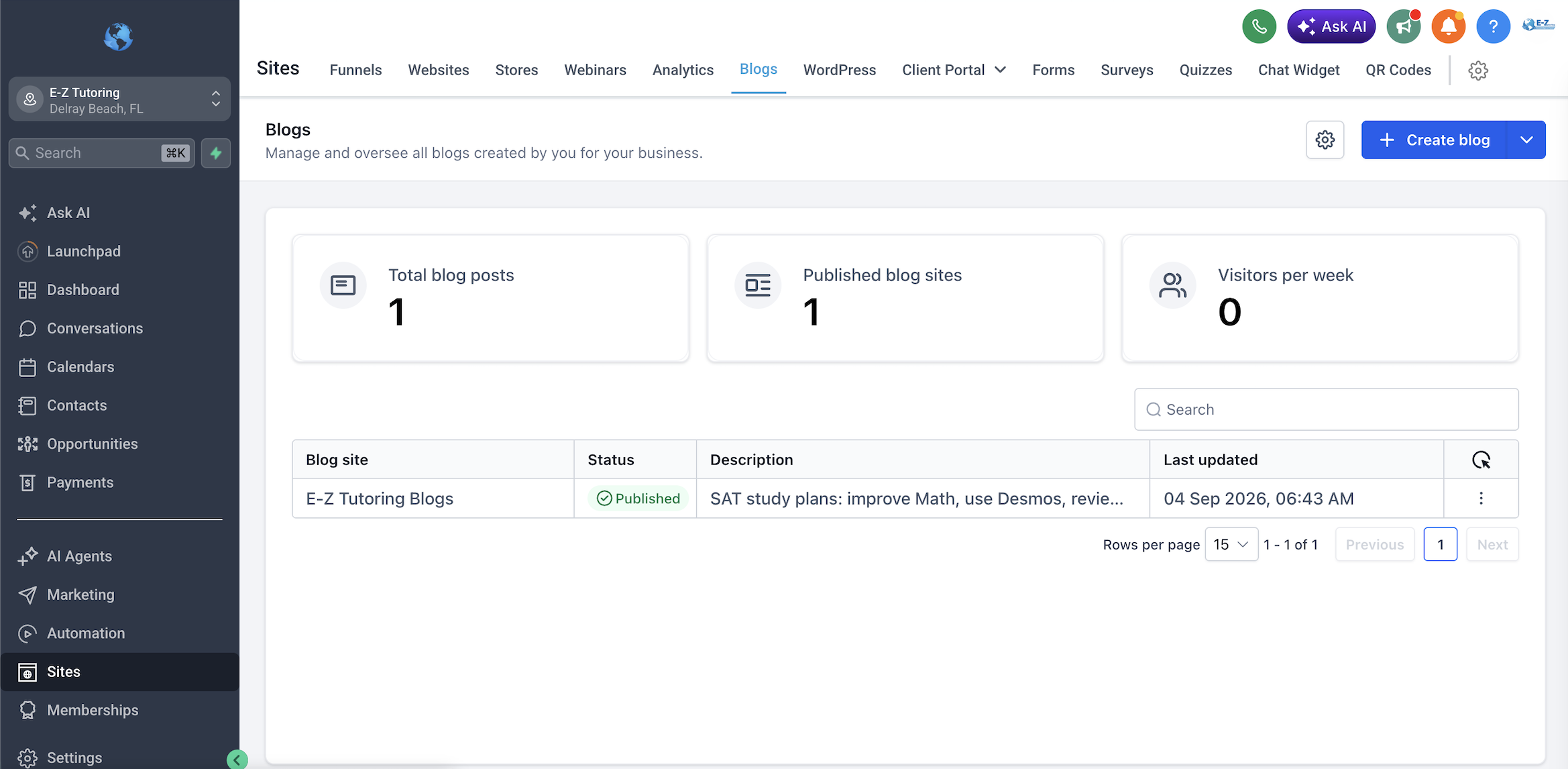
Tip: Click the image to open a larger preview.
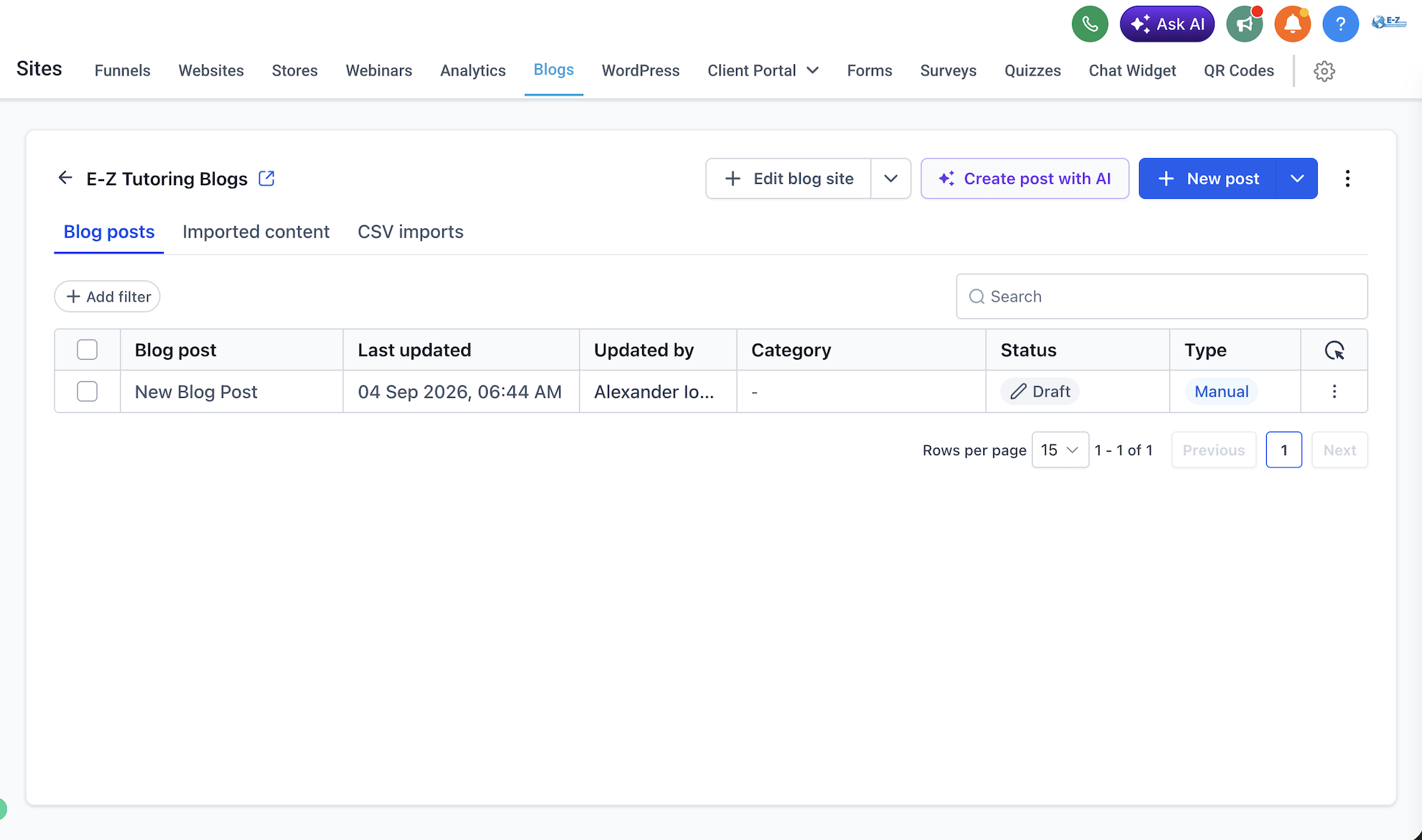
What to look for: The “Create Post With AI” button before starting the AI flow.
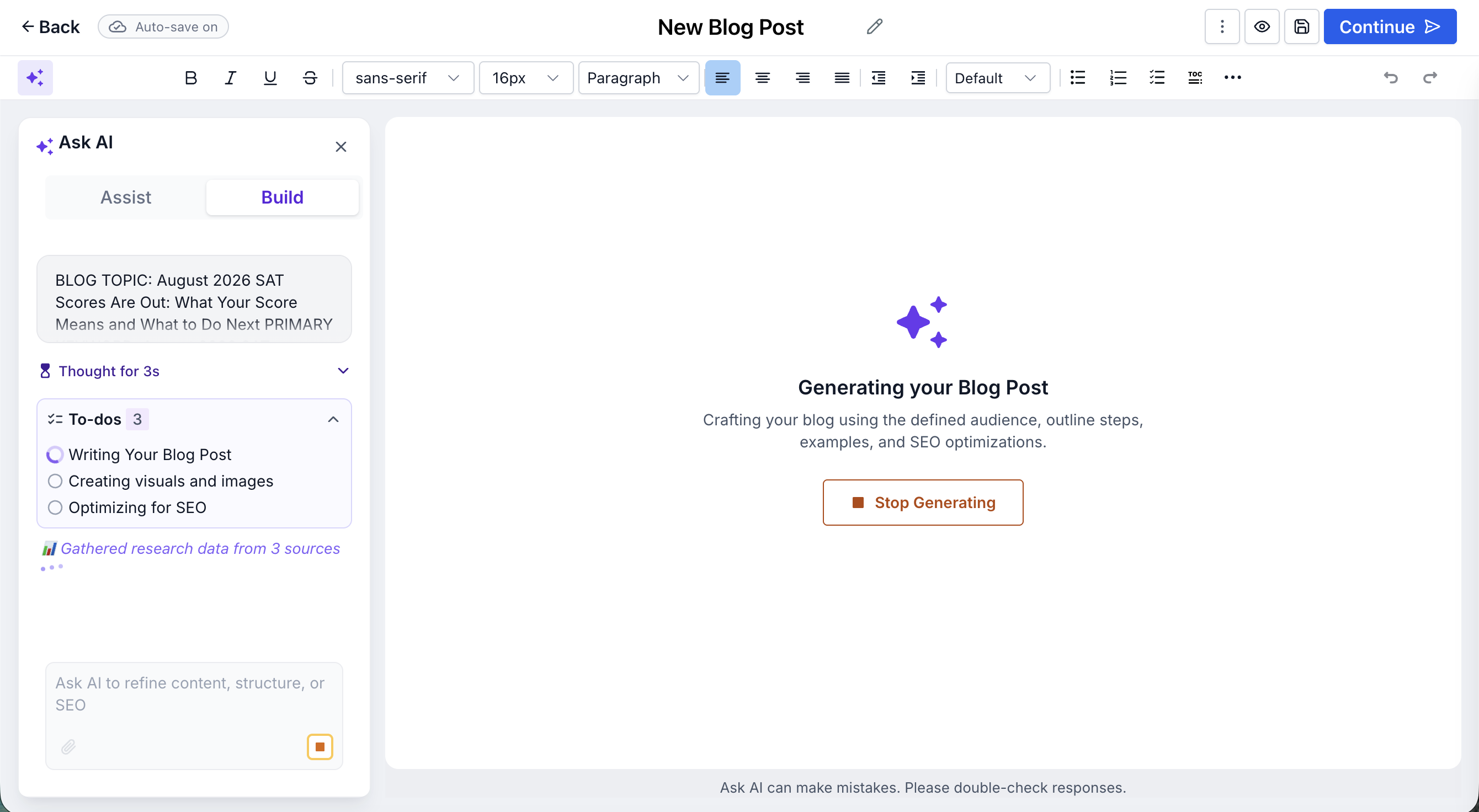
Tip: Click the image to open a larger preview.
Never publish an AI-generated article without reviewing it. Confirm that all SAT dates, deadlines, policies, statistics, links, and score information are accurate.
BLOG TOPIC: [INSERT THIS WEEK’S SEO TOPIC]

PRIMARY KEYWORD: [INSERT THIS WEEK’S PRIMARY KEYWORD]

Create a complete, publication-ready blog post for E-Z Tutoring using the topic and primary keyword above.

## LENGTH REQUIREMENT

The COMPLETE BLOG ARTICLE in Part 3 must be **600–800 words total**, including the opening answer, introduction, body, Key Takeaways, and FAQ.

Aim for approximately a **3–4 minute read**.

Do not exceed 800 words. If the draft is longer, shorten it before returning the final article while preserving factual accuracy and the most useful information.

Prioritize usefulness and clarity over comprehensiveness. Cover only the main question and the most relevant supporting points. Do not try to cover every possible subtopic related to the keyword.

Keep:
- Opening answer: 2–3 concise sentences
- Introduction: approximately 40–60 words; do not repeat the opening answer
- Main body: 3–4 focused H2 sections, generally 80–120 words each
- Key Takeaways: 3 short bullets
- FAQ: 3 questions with concise answers, generally 25–40 words each

These section lengths are guidelines within the 600–800-word total, not separate quotas. Keep every section brief, avoid repeating information, and remove filler or optional subtopics before exceeding the word limit.

The word limit applies only to the visible article, not SEO metadata, research notes, image prompts, internal-link recommendations, or page-level custom code.

Research and determine:
- Search intent
- Target audience
- Useful secondary keywords
- Article structure
- Authoritative sources
- SEO metadata
- Internal-linking opportunities

Research the topic before writing.

Use current, authoritative primary sources whenever possible.

For official SAT dates, scoring, Bluebook, registration, policies, and test information, prioritize the College Board.

Verify every:
- Date
- Deadline
- Policy
- Statistic
- Score requirement
- Factual claim

Never invent:
- Facts
- Quotations
- Testimonials
- Statistics
- Student results
- E-Z Tutoring experiences

If something cannot be verified, omit it or clearly mark it for human review.

Write for high-school students and their parents in a confident, clear, practical, and expert tone.

The article should sound like it came from an experienced SAT educator, not a generic AI writer.

Use:
- Short paragraphs
- Direct explanations
- Useful examples
- Bullets
- Numbered steps
- Checklists
- Tables only when they genuinely make the article easier to understand

Avoid:
- Filler
- Repetition
- Keyword stuffing
- Unnecessary background information
- Fake urgency
- Unsupported score guarantees
- Exaggerated claims
- Fake personal stories
- Generic AI phrases such as:
  - “in today’s fast-paced world”
  - “unlock your potential”
  - “embark on a journey”
  - “delve into”
  - “game-changer”
  - “navigating the landscape”

Create one strong blog title that serves as the only H1.

GoHighLevel may automatically display the post title as the H1, so do not insert a second H1 inside the article body.

Immediately after the title, provide a concise two-to-four-sentence answer to the article’s main question.

It should make sense independently if quoted by:
- Google
- An AI Overview
- A voice assistant
- Another answer engine

Then include:

1. A short introduction explaining who the article is for and what the reader will learn.
2. A focused body organized with descriptive H2 headings.
3. H3 headings only when genuinely necessary.
4. Practical examples, steps, checklists, or a comparison table only when useful.
5. A short Key Takeaways section.
6. A FAQ section with 3 genuine follow-up questions and brief answers.
7. Do NOT include a visible final CTA. The page-level SAT Insider email capture code handles conversion.

Do not add sections simply to make the article appear more comprehensive.

Use the primary keyword naturally in:
- SEO title
- URL slug
- Introduction
- At least one appropriate heading
- Meta description
- Body

Naturally include a small number of closely related secondary keywords and relevant entities.

Do not stuff keywords or create sections solely to target secondary keywords.

## SEO DETAILS

Create:

- One H1 title
- One SEO title
- A short lowercase URL slug with hyphens
- A unique meta description of approximately 140–160 characters when practical
- A short blog-card excerpt
- A recommended category
- 3–6 relevant tags
- A cover-image concept
- A descriptive image filename
- Accurate alt text
- A complete AI image-generation prompt

Optimize for traditional search and AI-powered answers by including:
- A direct answer near the beginning
- Clear headings
- Concise answers beneath question headings
- Self-contained factual statements
- Clear definitions
- Specific dates when relevant
- Important information in visible text

Clearly distinguish official facts from E-Z Tutoring recommendations.

Link important factual claims to authoritative primary sources using descriptive anchor text.

## INTERNAL LINKS

Recommend **2–4 relevant internal links**.

Never invent E-Z Tutoring URLs.

If an exact URL is unavailable, use a clear placeholder such as:

[INTERNAL LINK: Related E-Z Tutoring article about Bluebook practice tests]

## EMAIL CAPTURE CTA

Do NOT place a traditional CTA button, promotional box, tutoring CTA, diagnostic CTA, cohort CTA, or final sales CTA inside the visible article body.

Do NOT add a CTA at the bottom of the article.

Instead, every blog must use the E-Z Tutoring SAT Insider email capture form as the primary conversion mechanism.

During the INITIAL BUILD of the blog, install the exact page-level Custom Code provided below using the blog’s Custom Code feature.

CRITICAL INSTRUCTIONS:

- This is PAGE-LEVEL custom code.
- It is NOT visible article content.
- Do not paste this code into the article body.
- Do not display the code as text.
- Install the code exactly ONCE.
- Do not create multiple Custom Code entries containing this code.
- Before adding the code, check whether this SAT Insider code or form ID already exists on the page.
- If it already exists, do NOT add another copy.
- Do not modify the form ID.
- Do not recreate the form.
- Do not rewrite the code.
- Do not manually insert another CTA inside the article.
- Do not add a CTA at the end of the article.
- Do not translate, rewrite, shorten, expand, or otherwise modify the article while installing the code.
- The code automatically finds the article and injects the SAT Insider signup form approximately 35% through the article.
- Once the page-level code is installed, no additional CTA is needed.
- The GHL form handles the email capture and CRM submission.
- After installing the page-level code, stop making structural changes to the article unless specifically required for factual or formatting corrections.

Use this exact page-level Custom Code:

<style>
  #ez-sat-inline-form {
    width: 100%;
    max-width: 820px;
    margin: 42px auto;
  }

  #ez-sat-inline-form iframe {
    display: block;
    width: 100%;
    height: 380px;
    border: 0;
    border-radius: 0;
  }

  @media (max-width: 600px) {
    #ez-sat-inline-form {
      margin: 30px auto;
    }

    #ez-sat-inline-form iframe {
      height: 430px;
    }
  }
</style>

<script>
(function () {

  function findArticle() {
    const candidates = Array.from(document.querySelectorAll(
      'article, main, .blog-post-content, .blog-content, .post-content, .article-content, [class*="blog"][class*="content"], [class*="post"][class*="content"]'
    ));

    let best = null;
    let mostParagraphs = 0;

    candidates.forEach(function(el) {
      const count = el.querySelectorAll('p').length;

      if (count > mostParagraphs) {
        mostParagraphs = count;
        best = el;
      }
    });

    return best;
  }

  function installForm() {

    const oldCTA = document.getElementById('ez-sat-blog-cta');

    if (oldCTA) {
      oldCTA.remove();
    }

    if (document.getElementById('ez-sat-inline-form')) {
      return;
    }

    const article = findArticle();

    if (!article) return;

    const paragraphs = Array.from(
      article.querySelectorAll('p')
    ).filter(function(p) {
      return p.innerText.trim().length > 40;
    });

    if (paragraphs.length < 3) return;

    const position = Math.max(
      2,
      Math.min(
        paragraphs.length - 1,
        Math.floor(paragraphs.length * 0.35)
      )
    );

    const target = paragraphs[position];

    const wrapper = document.createElement('div');

    wrapper.id = 'ez-sat-inline-form';

    wrapper.innerHTML = `
      <iframe
        src="https://api.leadconnectorhq.com/widget/form/McSnNcCWI4GaJ551ymhh"
        id="inline-McSnNcCWI4GaJ551ymhh"
        data-layout='{"id":"INLINE"}'
        data-trigger-type="alwaysShow"
        data-trigger-value=""
        data-activation-type="alwaysActivated"
        data-activation-value=""
        data-deactivation-type="neverDeactivate"
        data-deactivation-value=""
        data-form-name="Blog"
        data-height="380"
        data-layout-iframe-id="inline-McSnNcCWI4GaJ551ymhh"
        data-form-id="McSnNcCWI4GaJ551ymhh"
        data-cookie-consent="true"
        data-cookie-consent-provider="auto"
        title="SAT Insider Updates">
      </iframe>
    `;

    target.insertAdjacentElement(
      'afterend',
      wrapper
    );

    if (!document.querySelector(
      'script[src*="form_embed.js"]'
    )) {

      const script = document.createElement('script');

      script.src =
        'https://link.msgsndr.com/js/form_embed.js';

      script.async = true;

      document.body.appendChild(script);
    }
  }

  if (document.readyState === 'loading') {

    document.addEventListener(
      'DOMContentLoaded',
      function() {
        setTimeout(installForm, 500);
      }
    );

  } else {

    setTimeout(installForm, 500);

  }

})();
</script>

## COVER IMAGE

Create a professional landscape cover-image recommendation, ideally approximately 1200 × 630 pixels.

It should be:
- Relevant
- Uncluttered
- Consistent with E-Z Tutoring’s white and light-blue branding

Do not place important information inside the image.

Alt text must accurately describe the visible image and must not contain keyword stuffing.

## OUTPUT FORMAT

Return the work in this order:

### PART 1: SEO PUBLISHING DETAILS

Keep this section concise.

Include:

- Search intent
- Target audience
- Primary keyword
- Secondary keywords
- Suggested category
- Suggested tags
- H1 title
- SEO title
- URL slug
- Meta description
- Blog-card excerpt
- Recommended author
- Suggested author bio
- Last-reviewed date
- Email capture CTA: SAT Insider Updates
- CTA placement: Automatically injected approximately 35% through the article

### PART 2: COVER IMAGE PACKAGE

Keep this section concise.

Include:

- Cover-image concept
- Recommended filename
- Alt text
- Caption
- Complete image-generation prompt

### PART 3: COMPLETE BLOG ARTICLE

Write the complete article ready to publish in GoHighLevel.

**Target length: 900–1,400 words.**

Use:
- Proper H2 and H3 structure
- Short paragraphs
- Authoritative links
- Key Takeaways
- 3–5 FAQs

Do NOT place:
- A final CTA
- A cohort CTA
- A diagnostic CTA
- A tutoring CTA
- A newsletter CTA
- A manually created email signup CTA

The SAT Insider form will be injected automatically through the page-level Custom Code.

Do not repeat the same advice in:
- Introduction
- Body
- Key Takeaways
- FAQ

### PART 4: INTERNAL-LINKING RECOMMENDATIONS

Recommend only 2–4 links.

For each, provide:

- Suggested destination
- Anchor text
- Placement

Use placeholders instead of inventing URLs.

### PART 5: SOURCES AND FACT-CHECK

Keep this section brief.

List only sources actually used for meaningful factual claims.

For each source, provide:

- Organization
- Page title
- URL
- Claim supported

Identify anything requiring human verification.

## FINAL QUALITY CHECK

Before finishing, confirm that:

- The article is approximately 900–1,400 words.
- It satisfies the primary search intent without unnecessary tangents.
- It opens with a direct answer.
- Facts are accurate and current.
- It provides specific, useful advice rather than generic filler.
- Keywords are used naturally.
- No information was fabricated.
- Sections do not unnecessarily repeat each other.
- No manual CTA was added inside the article.
- No bottom-of-article CTA was added.
- No diagnostic CTA was added.
- No cohort CTA was added.
- The SAT Insider page-level Custom Code was installed exactly once.
- The SAT Insider form ID remains McSnNcCWI4GaJ551ymhh.
- No duplicate Custom Code entry was created.
- The article itself was not rewritten or translated while installing the Custom Code.

Do not increase the article length simply for SEO.

Concise, genuinely useful coverage is preferred over a long article.
Before continuing, quickly review the finished article:
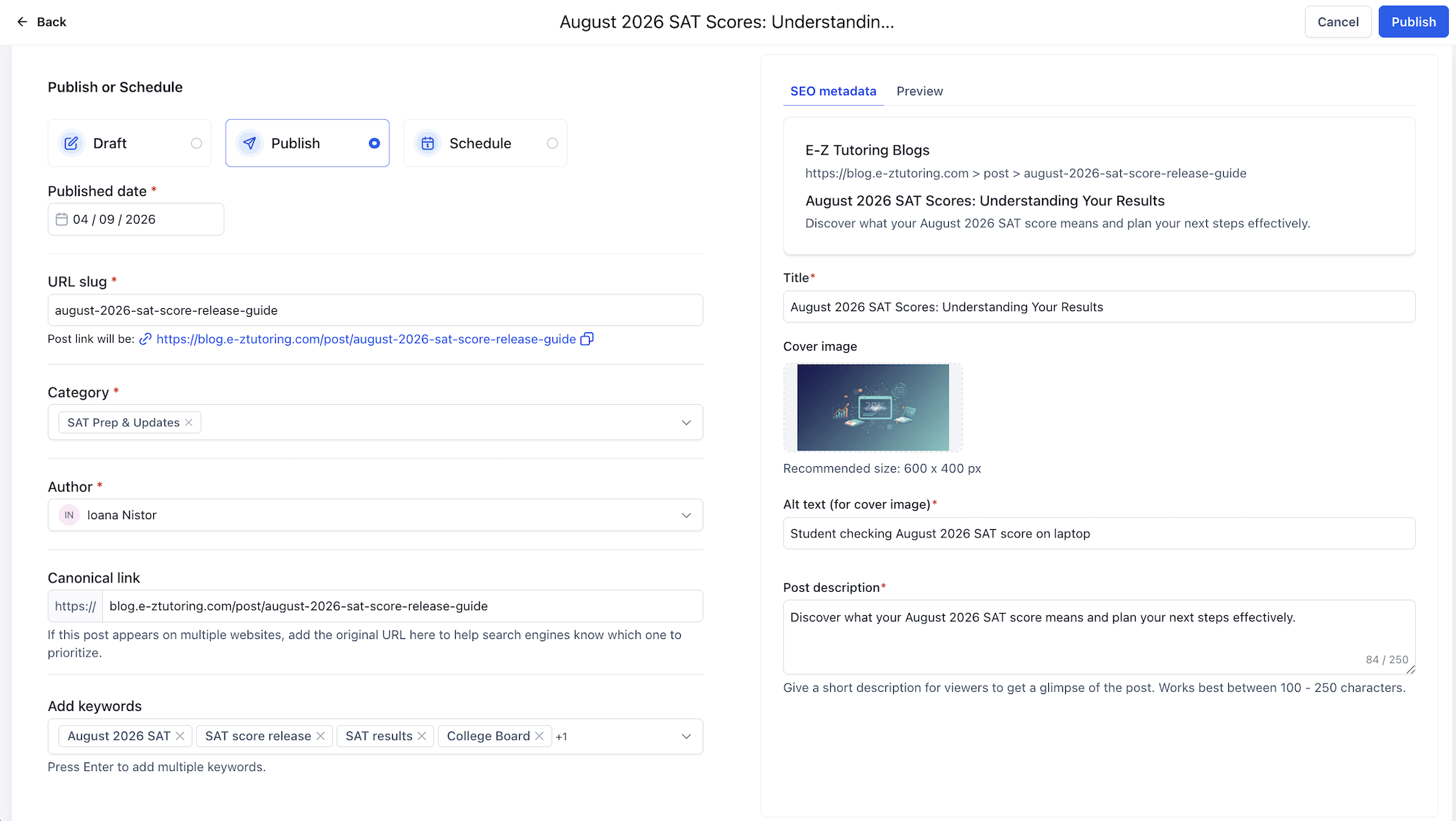
Blog settings and publishing screen
Requesting indexing does not guarantee immediate indexing. Do not repeatedly submit the same URL.
Do not copy the SEO publishing details, image-generation instructions, source log, internal notes, or AI prompts into Facebook. Only post the reader-facing article.
2. New Private Student
This SOP applies only when the student is completely new and does not already exist in our system. If the student already has a profile in the system, do not complete this onboarding process again.
The “New Onboarding” snippet directs the family to onboarding.e-ztutoring.com.
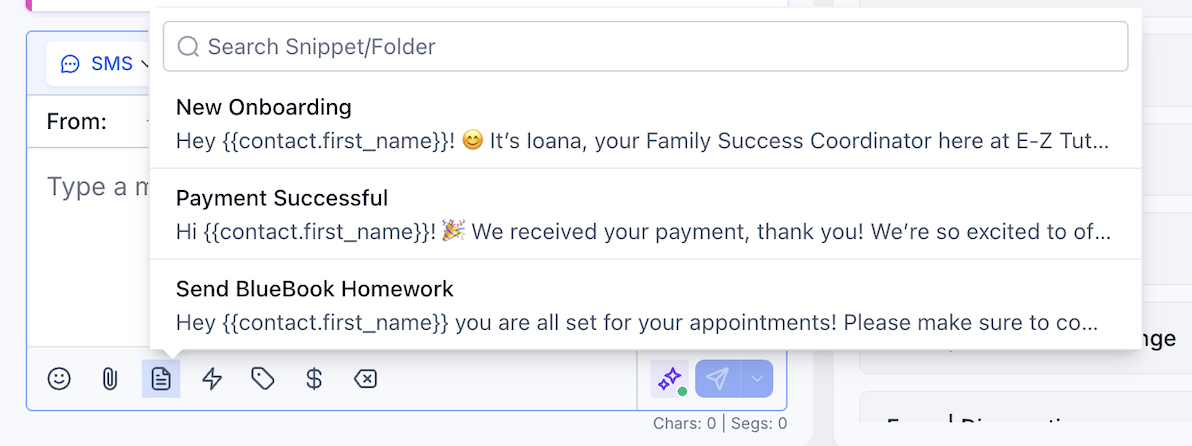
What to look for: Confirm the correct snippet is selected (“New Onboarding”) and that the message points the family to the onboarding form link. Tip: Click the image to open a larger preview.
Once the family completes the onboarding form, the system will automatically handle most of the onboarding process.
The administrative assistant will receive a notification when the onboarding form has been completed. Wait for this notification before moving to the final steps.
3. New Cohort Student
This SOP is only for a student who already exists in the system. Before beginning, confirm all three requirements below. If any requirement is not met, stop and resolve the missing profile(s) or contact link before continuing:
For cohort enrollments, never create or send an invoice. The assistant must use a payment link.
Select the correct payment link based on how far away the next SAT is, and send that link directly to the parent.
Cohort payments must always be collected through the correct payment link. Do not use invoices.
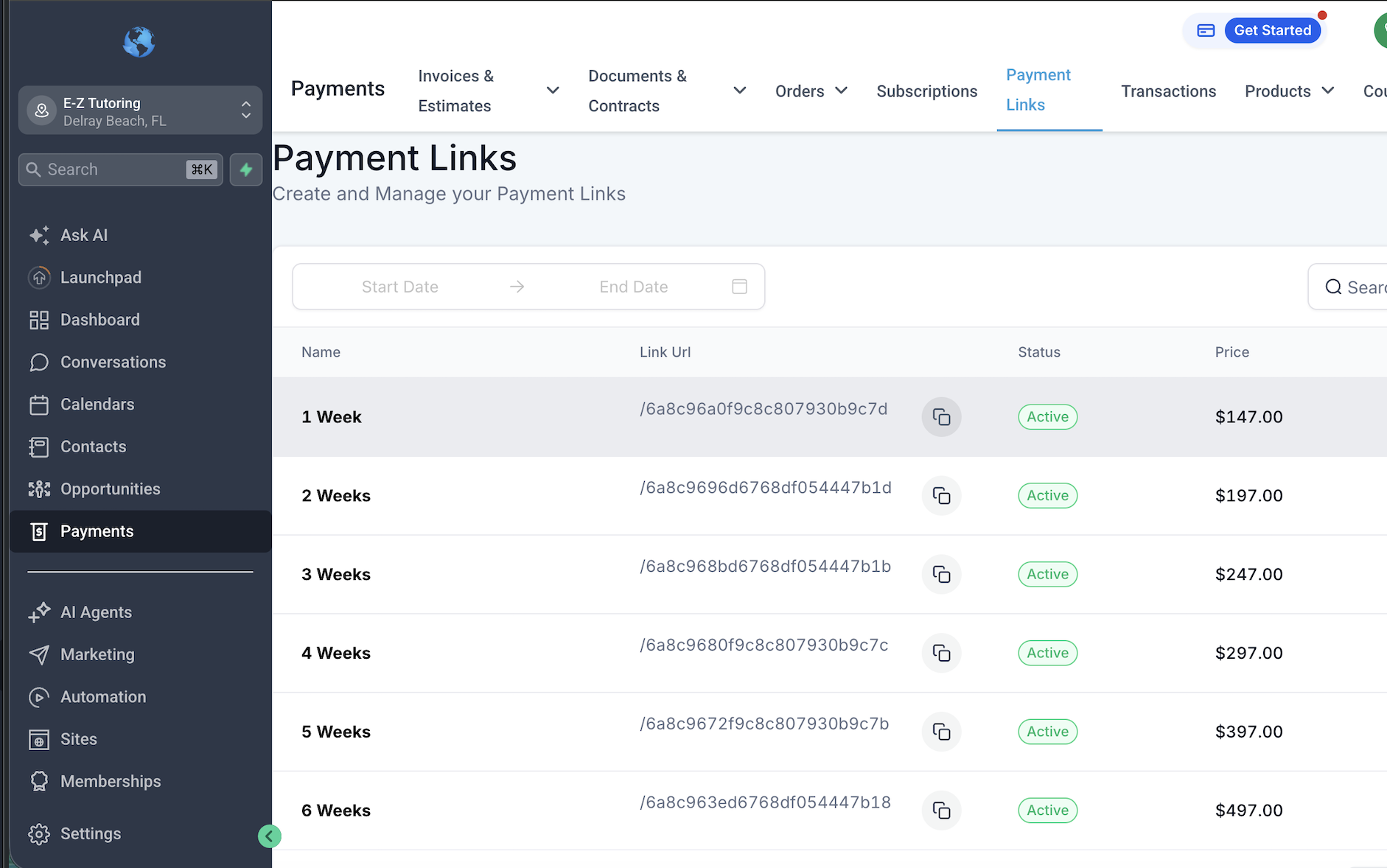
What to do here: Locate the payment links and select the correct link based on how far away the next SAT is. Tip: Click the image to open a larger preview.
Wait until the payment has been successfully completed before enrolling the student.
Do not manually enroll a student based only on a promise to pay or because the payment link was sent. Verify that payment was received first.
Once payment has been confirmed, go to:
cohorts.e-ztutoring.com/manual-enroll
The assistant will need to enter the system password, which she should already have securely saved. Do not display or store the system password anywhere on the public SOP page.
Complete the manual-enrollment form using the correct student, parent, payment, and cohort information.
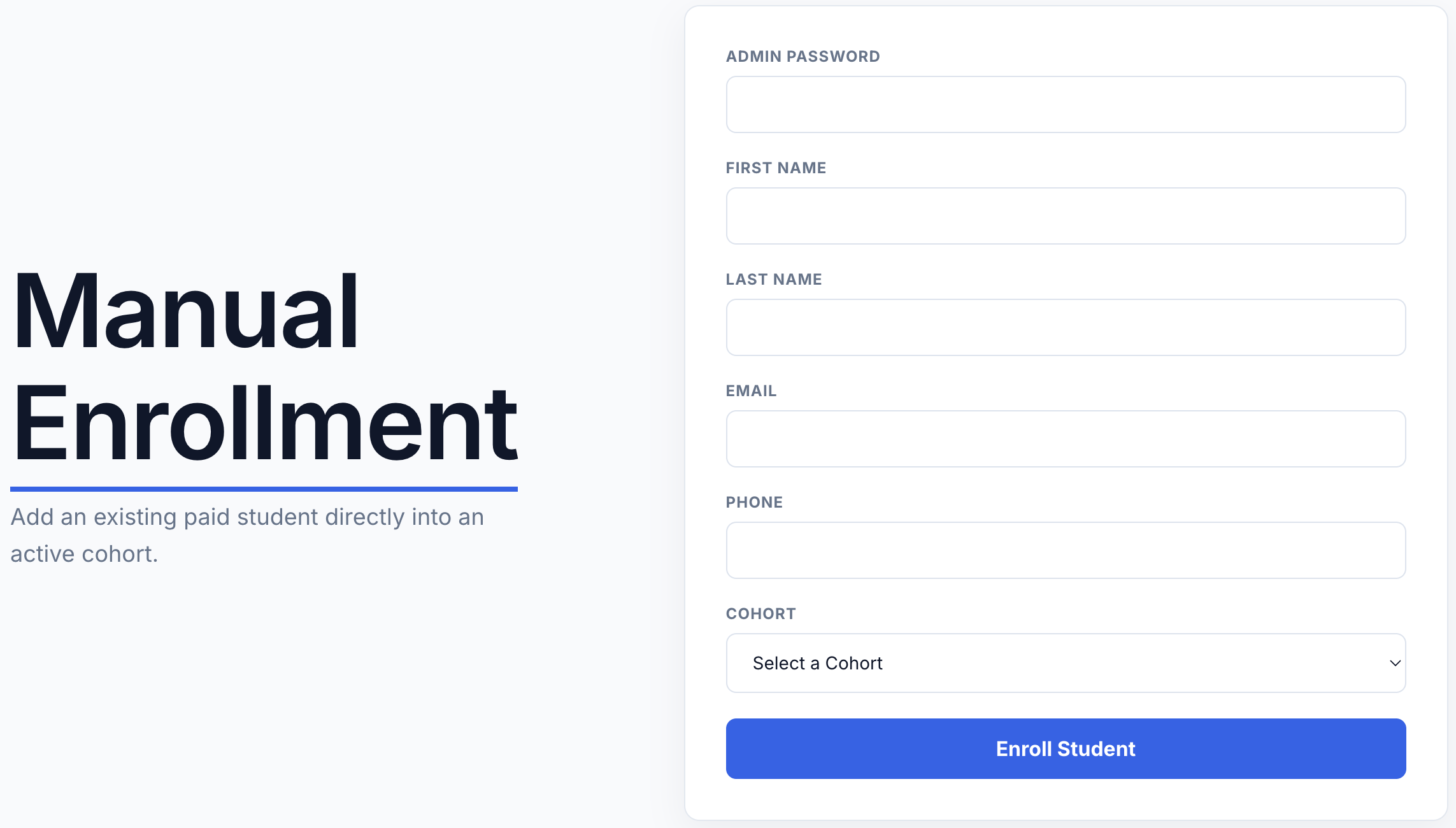
What to do here: Use the manual-enrollment page to enroll the student after payment is confirmed. Tip: Click the image to open a larger preview.
After the manual-enrollment form is successfully submitted, the system will automatically:
The assistant should not manually recreate anything already handled by the system.
4. Creating a New Cohort
Set up a new SAT cohort with the correct tutor, class schedule, GHL cohort calendar, recurring Zoom room, Outlook events, and Fathom recording/report automation.
1Confirm the cohort details
2Create or verify the tutor’s GHL cohort calendar
3Create the Zoom room and import it into Outlook
4Add the tutor and create the cohort
5Set up the tutor’s Fathom recording and report Zap
https://ez-parent-portal-api.plain-bird-fbec.workers.dev/recording-sync
| JSON key | Map from |
|---|---|
recording_share_url | Fathom Recording Share URL |
meeting_scheduled_start_time | Fathom Meeting Scheduled Start Time |
fathom_user_email | Fathom User Email |
meeting_title | Fathom Meeting Title |
pdf_download_url | PDFMonkey Download URL |
Use the cohort /recording-sync action. Do not copy the private-session /session-ingest action or its student_email, tutor_email, or meeting_url fields. Cohort recordings and reports belong to the class session and are shared with entitled students.